 |
 |
Contacts Webmaster |
|
Technology Concept
The Call & See Technology relies on two parallel communication channels between a
customer and a content provider:
1. Internet connection Any type of Internet connection, no matter whether dial-up, ADSL or broadband, can be used. Call & See is completely independent of the technology used for accessing the Internet. 2. Telephone connection While surfing the web a customer makes a phone call to the telephony server. The price charged to the customer will appear on his or her phone bill. Depending on the type of service, the call may be forwarded and connected to a person to permit direct conversation. The non-free-of-charge content is available as long as the customer stays on the phone. Disconnecting the phone call interrupts the web content. Note: this scheme makes most sense where the web content consists of a (live) video stream. However, other use cases can be beneficial as well. System Components
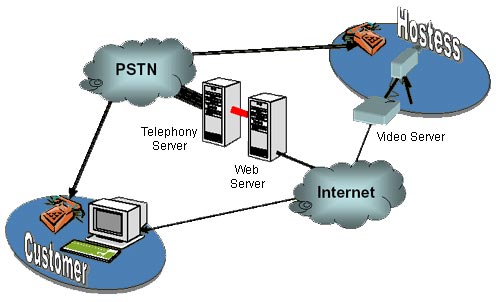 Structural Overview Telephony Server
The Telephony Server is connected to the PSTN via a PRI (primary rate interface) connection. It handles calls from customers and optionally connects them to a content provider. Web Server Interacts with the Telephony Server, manages customer sessions and controls the video stream. Video Server Converts the signal from a video camera into an Internet compatible data stream. PSTN The Public Switched Telephony Network system is used for billing and voice communication. Internet The Internet carries the video stream. Customer The customer uses a regular computer running standard software with any type of Internet connection. Content Provider (e.g. Hostess) The person behind the camera. For logging in and out, a web browser (i.e. PC with Internet connection, not in depicted in the diagram) is required in addition. Typical Scenario
A web surfer browses the Internet and finds some content which is not free of
charge. Clicking on the hyperlink opens a pop-up window with instructions to make a
call to a business number. The surfer calls and hears a short code, which s/he enters
in the browser. Then, the video image of a content provider, e.g. an expert or a
hostess, becomes visible.
At the same time the phone call is connected to the content provider, thus the
customer can directly talk to that person.
The value content stays visible for the duration of the call. When the customer (or
the content provider) disconnects, the Call & See technology ensures that the video
stream is cut off as well.
The price for consuming the value content is added to the customer▓s phone bill.
Using an anonymous prepaid chip, the customer may choose to keep such expenses
invisible to other parties. Comparison of Existing Technologies
Credit Card
Payments based on credit cards are a well established scheme. Advantages:
Dialers are quite a common billing mechanism. Yet, this technology has received a very bad reputation. Dialers appeared that are truly malicious to the point where they pose a threat comparable to viruses and Trojan horses etc. As a result, people have become very reluctant to use dialers. Advantages:
With this scheme customers are required to sign up and typically make a prepayment. Then they can consume services until their credit points are used up. Advantages:
Dedicated access software is often used in conjunction with online accounts. The user is required to download and install dedicated software on his or her computer. Advantages:
All sorts of attempts have been made to create a currency system suitable for the Internet. None has really every reached anything like a general acceptance. Thus, these system are not viable and useful for the time being. Call & See Advantages:
Call & See avoids most of the severe drawbacks of other technologies and is clearly superior for a range of application areas.
Invocation
Call & See is typically integrated into an existing web site, which provides an overview of specific offers. When a customer selects an item, he or she just clicks a hyperlink. A pop-up window opens, in which the non-free-of-charge content is displayed. Service Types
Although, Call & See can be used for other purposes, it is best suited where video streams shall be offered, in particular live streams directly from a video camera. In cases, where a video stream shall be available to multiple users in parallel, a video broadcast server can be integrated. CP Console In case of expert or hostess services (as opposed to access to archived content), the content providing person needs a way to interact with the system. For instance to start work, to take breaks or to modify various system parameters. Call & See provides a fully web based user interface, which permits the content provider to perform the following tasks:
For setting up and configuring a system as well as managing it during operation, system administrators need a set of tools to perform their task. Call & See features a fully web based administration tool that provides access to all system settings. Moreover, the tool supports a number of wizards to efficiently execute typical tasks, such as registering new content provider, setting up their workplaces etc. Accounting Data relevant for accounting is permanently collected by Call & See. Dedicated tools permit to derive accounting information, such as work- and online time of content providers, average session durations etc. Statistics The same data can easily be used to create statistical analyses about the system: total work and online time, average session durations, number of sessions, percentage of successful sessions etc. Interfaces Call & See supports the following interfaces to other systems:
Security
Any interesting content that is not free of charge attracts hackers. Complete security
is neither possible nor affordable. Call & See has a number of security measures built
in to avoid misuse in an efficient and cost effective way.
Patent Coverage
inACTsoft GmbH has a patent pending that covers the Call & See technology. Thus,
any comparable technology that uses a phone connection to charge for and control a
service made available through the Internet is potentially in conflict with this patent.
Current State
At present, all features are implemented and have been
thoroughly tested in an extended field test with actual customers.
Future Extensions
© 2003 inACTsoft Gmbh, Zurich. All rights reserved |
||||||||||||||||||||


